Wild West Paper Set
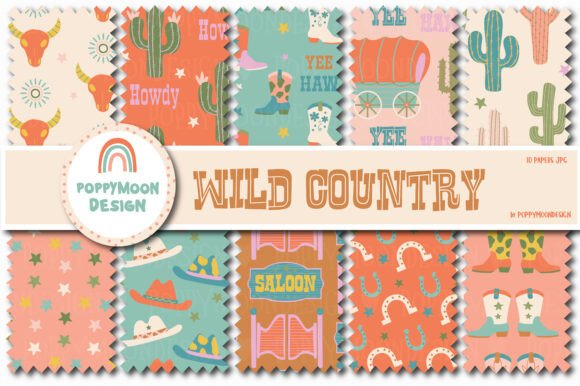
If you are looking to inject a burst of personality into your digital projects, the Wild West Paper Set offers a compelling solution. This vibrant collection features colorful cowboy boots, cacti, and cowboy hats, designed to bring a fun and charming flair to your designs. However, before you simply download and start slapping patterns onto your work, it is essential to understand how to use these assets effectively. Many creators rush into using thematic paper packs without considering resolution, licensing, or design cohesion, often leading to results that look amateurish rather than professional.
This guide aims to help you navigate the specifics of this 10-coordinating paper set, ensuring you get the most out of your purchase while avoiding common pitfalls that can undermine the quality of your final output.
Understanding the Product Specifications
The core appeal of this set lies in its versatility and specific technical details. You are getting ten distinct coordinating papers, which allows for layering and creating complex backgrounds without needing multiple disparate sources. The file format is JPG, and each sheet measures 12 x 12 inches. While these specifications seem straightforward, they carry significant implications for how you should utilize them.
First, consider the 12 x 12 inch size. This is a standard dimension in the scrapbooking and digital crafting world, particularly for projects intended for print at that exact scale. If your project requires a different aspect ratio—such as a standard letter-sized document (8.5 x 11) or a social media banner (1080 x 1080 pixels)—you will need to crop or resize the images. Resizing JPG files can sometimes lead to pixelation if not done carefully. Always check the original resolution of the downloaded files before committing to a large-scale print job.
Secondly, the JPG format is widely compatible but lossy. Unlike PNGs, which support transparency, JPGs have solid white backgrounds by default. This means you cannot easily overlay these patterns on top of other textured backgrounds without seeing a harsh white box around your cowboy hat or boot motifs. For web designers or those creating layered digital art, this lack of transparency might limit your creative options unless you plan to use masking techniques in software like Photoshop or Canva.
Common Mistakes When Using Thematic Digital Papers
One of the most frequent errors beginners make is ignoring the color palette coordination. Just because ten papers are sold together does not mean they will all harmonize with every color scheme. The Wild West theme inherently includes earth tones, bright reds, denim blues, and sandy yellows. If your project’s primary brand colors are cool pastels or monochromatic grays, forcing these vibrant Western elements into the design can create visual clutter and discord.
To avoid this, evaluate the dominant hues in the pattern. Do they complement your text color? Will the busy nature of the cowboy boots and cacti distract from the main message? A practical approach is to place the pattern behind a semi-transparent solid color block or use it sparingly as an accent border rather than a full-page background. This ensures the "fun and charming flair" enhances the design rather than overwhelming it.
Another oversight is neglecting licensing rights. Before purchasing or downloading any digital asset, always read the End User License Agreement (EULA). Some sets are designated for personal use only, meaning you cannot use them on products you sell, such as printed t-shirts, mugs, or commercial website templates. Assuming that a low price point implies broad commercial rights is a costly mistake. Verify whether you have permission to use the Wild West Paper Set in commercial projects, especially if you are a small business owner or freelancer.
Maximizing Creative Potential
Once you have verified the specs and permissions, you can begin to explore more advanced applications. The variety in this set—featuring boots, hats, and cacti—suggests a playful tone. It is perfect for children’s party invitations, educational materials about geography or history, or branding for casual dining establishments. However, the key to success lies in balance.
- Layering Techniques: Since the files are JPGs, try placing one pattern over another with reduced opacity to create depth. Alternatively, use the patterns as cut-out shapes within larger compositions.
- Text Integration: Ensure high contrast between your text and the busy patterns. Bold, sans-serif fonts often work best against intricate designs like cowboy boots. Avoid thin, delicate scripts that may get lost in the visual noise.
- Print Quality Check: If you intend to print these 12 x 12 sheets, do a test print first. Screen colors often differ significantly from printed ink. The vibrant colors mentioned in the product description might appear muted or shifted depending on your printer’s calibration.
Evaluating Value and Alternatives
When comparing this Wild West Paper Set to other options, consider the density of the imagery. Some digital paper packs offer subtle textures that allow for more flexibility, while others, like this one, feature bold, literal icons. If your project requires a subtle backdrop, this set might be too loud. In such cases, you might look for "Western-inspired" textures—like wood grain or starry night skies—that evoke the theme without being overt.
However, if your goal is immediate recognition and thematic clarity, this set is superior. The inclusion of ten coordinating papers provides excellent value, reducing the need to hunt for matching elements elsewhere. It saves time and ensures consistency across a multi-page document or a series of social media posts.
Final Recommendations for Success
To ensure satisfaction with your Wild West Paper Set, adopt a strategic approach to its application. Start by organizing your files into folders labeled by their primary color or motif. This makes retrieval faster during the creative process. Keep in mind that while the patterns are charming, they are decorative elements, not the sole focus of serious communication. Use them to frame content, highlight headers, or add personality to footers.
Remember that digital assets are tools, not magic fixes. Their effectiveness depends entirely on how well they integrate with your overall design strategy. By respecting the limitations of the JPG format, checking licensing terms, and balancing bold visuals with clear typography, you can leverage this unique collection to create designs that are both visually striking and professionally executed. Take the time to experiment with layouts before finalizing your project, and you will find that this vibrant set adds exactly the right touch of the Wild West to your work.