Surf Sand Digital Paper: A Guide to Choosing and Using the Right Design Elements
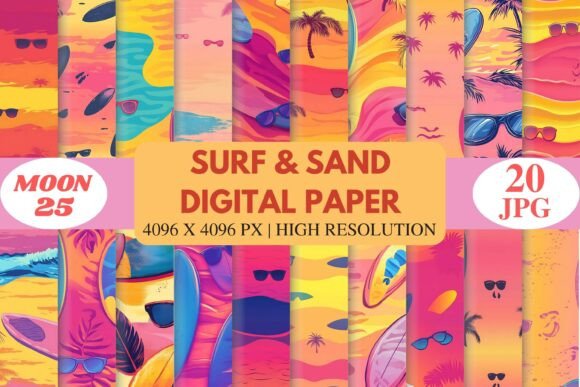
Designers, creators, and entrepreneurs often seek ways to infuse their projects with summer energy and coastal charm. That’s where Surf Sand Digital Paper comes in—a vibrant digital resource that brings beachside aesthetics into your creative workflow. With abstract surf scenes, flowing wave patterns, palm trees, sunglasses, surfboards, and sunset gradients in trendy hues like pink, coral, yellow, orange, and turquoise, this collection is a go-to for anyone looking to craft stylish, eye-catching summer-themed content.
What Is Surf Sand Digital Paper?
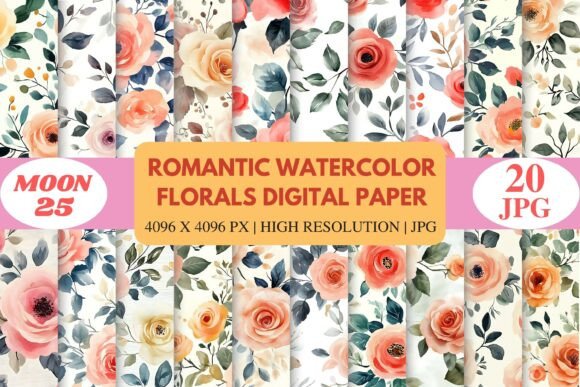
Surf Sand Digital Paper is a curated set of 20 high-resolution JPG files designed to mimic the look and feel of tropical beach environments. Each file measures 4096 × 4096 pixels, making them ideal for both digital and print applications. The seamless nature of these patterns allows them to tile without visible seams, which is especially useful for backgrounds, covers, or large-format prints.
Created with modern tropical aesthetics and surf culture in mind, these papers are more than just visuals—they’re mood boosters. Whether you're working on scrapbooking layouts, planner templates, sublimation projects, apparel designs, party decorations, branding materials, or print-on-demand products, they add instant warmth and vitality to your work.
Common Mistakes When Choosing Digital Papers
While digital paper packs can be incredibly helpful, there are some common missteps that users make when selecting or applying them:
- Ignoring resolution requirements: Not all design software or printing services accept low-resolution images. Always check if your project needs ultra-high resolution (like 300 DPI) before using any digital paper.
- Overlooking pattern tiling: Seamless patterns are essential for creating continuous backgrounds. If the pattern doesn’t tile well, it can lead to awkward visual breaks in your final design.
- Mismatching color schemes: The trendy colors in Surf Sand Digital Paper, such as coral and turquoise, may not suit every brand or project. Using them blindly without considering your existing palette can result in a disjointed look.
- Not verifying compatibility: Some digital tools require specific formats or layers. Even though these papers are in JPG format and compatible with most platforms like Photoshop, Canva, Procreate, Illustrator, Affinity Designer, Cricut Design Space, and Silhouette Studio, always double-check to avoid technical hiccups.
Why These Mistakes Matter
These errors might seem minor, but they can significantly impact your final output. For example, using a low-res image in a printed product could make your design appear blurry or unprofessional. Similarly, a poorly tiled pattern might ruin the clean, cohesive look you're aiming for in a layout or background.
If you're creating merchandise for a print-on-demand platform, mismatched colors or poor resolution can lead to customer dissatisfaction and lower sales. In branding or social media graphics, inconsistency in style can weaken your message and reduce engagement.
Better Choices for Maximum Impact
To get the best results from Surf Sand Digital Paper, consider the following strategies:
- Match the theme: Before downloading, think about how the beachy vibe aligns with your overall project. Are you designing a resort brochure? A summer planner? Or perhaps a line of casual wear? Ensuring thematic consistency will elevate your work.
- Test the pattern: Open one or two sample files in your preferred design tool and zoom out to see how the pattern tiles across a larger canvas. This helps you catch any alignment issues before finalizing your design.
- Adjust brightness and contrast: While the sunset gradients and ocean elements are visually rich, sometimes they need tweaking to fit better with text or other design elements. Use layer adjustments or blending modes to balance the colors and ensure readability.
- Use overlays wisely: Instead of applying the paper directly as a background, try using it as an overlay or texture. This gives your design more depth while maintaining clarity in key areas like headings or call-to-action buttons.
Real-World Examples
Imagine you're designing a promotional poster for a beach yoga retreat. You select a bold coral and turquoise gradient from the Surf Sand pack as the base. Without adjusting the opacity or adding white space, the text becomes hard to read. A better approach would be to use the pattern as a subtle background, then layer in soft fonts and contrasting accents to highlight important details.
Another example: a small business owner wants to create custom tote bags featuring a tropical motif. They download Surf Sand Digital Paper and immediately apply it to the fabric design. However, because the pattern was too bright and busy, the logo gets lost. By choosing a simpler pattern from the same collection and placing the logo at the center with a transparent border, the design becomes more effective and visually balanced.
What to Check Before Downloading or Buying
Before committing to a purchase or download, take a few moments to verify the following:
- Resolution and size: Confirm that the 4096 × 4096 px JPG files meet your project's specifications. Many print jobs require at least 300 DPI, so ensure the paper fits those standards.
- License terms: Understand what you can and cannot do with the digital paper. Personal use vs commercial use matters, especially if you plan to sell items like apparel or stationery.
- Software compatibility: Though Surf Sand Digital Paper works with most major design tools, some features—like transparency or layer styles—might not translate perfectly in certain programs. Test the files in your workspace first.
- Color accuracy: View the samples on multiple devices to see how the colors render. Sometimes, monitors display shades differently, which could affect the final appearance of your project.
How to Integrate Them Into Your Workflow
Here’s a quick tip for beginners: start by importing one of the Surf Sand Digital Paper files into your design project. Set it as a background layer and lock it in place. Then build your design on top of it, ensuring that your main elements stand out clearly against the backdrop.
For advanced users, experiment with combining different papers from the pack to create unique collages. Try layering a wave pattern beneath a palm tree design, or blend two sunset gradients for a dynamic sky effect. The possibilities are endless when you understand how to manipulate and combine elements effectively.
Final Tips for Success
When working with digital papers like Surf Sand Digital Paper, remember that less is often more. These designs are already vibrant, so avoid overcrowding your layouts with too many elements. Let the beauty of the pattern shine through by keeping the rest of your design simple and intentional.
Also, don’t forget to save your project files with proper organization. Label each layer clearly, especially if you're using multiple papers or overlays. This makes revisions easier and keeps your workflow efficient.
Lastly, always preview your design in the final format—whether it’s a printed flyer, a website banner, or a T-shirt mockup. This step ensures that everything looks sharp and professional once it goes live or hits the market.
With thoughtful application and attention to detail, Surf Sand Digital Paper can become a powerful asset in your creative toolkit. It’s not just about having the right tools; it’s about knowing how to use them to create something memorable and impactful.